






If you’re spending hours scheduling classes, tracking fees, and managing student records, it’s time to switch to a smarter, easier way. Our tuition app and LMS automate the busywork, so you can focus on delivering exceptional lessons and growing your business.
White-labeled resources and professional tutor profiles.
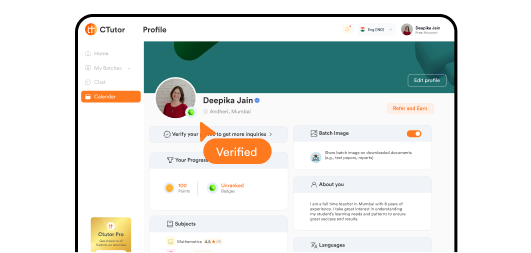
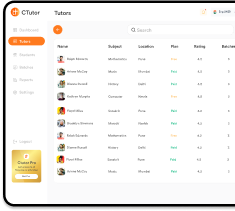
Verified profiles, ratings, and subject filters for better matching.
AI-powered quizzes, assignments, and progress reports.
Automate scheduling, fees, and attendance.
Manage multiple batches, collaborate with co-tutors, and scale with ease.
Save time, engage students, and grow your income with our comprehensive tutoring platform.
Everything you need to manage students, create content, and grow your tutoring business.
Create a distinct identity that stands out in the competitive tutoring market.
“With CTutor, you can showcase your expertise, earn trust through reviews, add your own branding, and build credibility with verified credentials—all in one place.”
Everything you need to organize your schedule in one powerful dashboard.
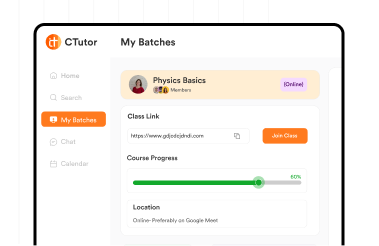
Easily schedule classes, manage batches, and track hours automatically. Collaborate with co-tutors and help students find the perfect match in seconds.
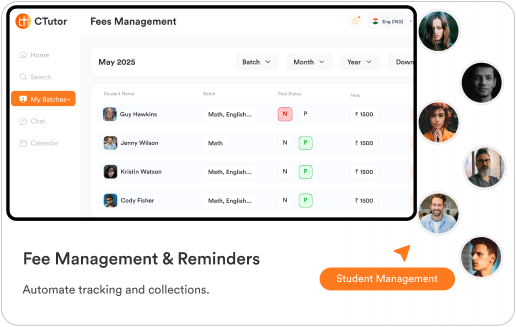
Save hours of manual work and avoid payment delays with automation.Focus on teaching, not paperwork.
Effortless student management with organized data, smart fee tracking, automated reminders, and reliable attendance—all in one place.
Make learning fun and effective
Transform learning with AI-powered tools that make study fun and effective. From custom worksheets and quizzes to rewards and progress tracking—all in one platform.
Automate administrative tasks and focus on what you do best – teaching.
Interactive tools and AI-powered content keep students motivated and learning.
Better organization and professional tools help you scale your tutoring business.
Everything you need to manage students, create content, and grow your tutoring business.
Learning & Development Consultant Communication and Leadership development skills Tutor on CTutor
Arts and Craft and Cooking tutor
Join thousands of tutors already using our platform to save time, engage students, and grow their income.
Yes, you can schedule and manage both seamlessly.
Not at all, it’s designed to be simple and intuitive.
Absolutely, with our white-label options.
Once you've successfully created your CTutor account, we recommend exploring the Playground feature as your first step. This interactive space allows you to familiarize yourself with the platform by testing out the creation of various educational resources, including assignments, tests, worksheets, and quizzes. The Playground serves as a risk-free environment where you can experiment with all the tools and features before using them with actual students.
Beginning your teaching journey on CTutor involves several straightforward steps. After you and your student have reached an agreement to start learning through the platform, you'll need to create a batch with the mutually agreed-upon days, dates, and timings. You can then invite the student either by sending a direct invite through the batch details screen or by sharing the unique batch code with them. Once the student accepts your invitation, their profile will appear in the members screen within the App. For each class you conduct, remember to mark attendance using the attendance section—this is crucial as it tracks and displays the hours you've taught on CTutor directly on your profile. If you're conducting online classes, simply paste your meeting link in the edit batch section, which will enable students to join the class seamlessly through the App.
When you receive a chat request from a student, you have the option to accept it, which will immediately open a dedicated chat channel between you and the student. This communication feature allows you to discuss learning requirements, answer preliminary questions, and build rapport before committing to formal tutoring sessions. The chat function is designed to facilitate smooth communication and help both parties establish expectations and teaching arrangements.
When a student books a demonstration session with you, the first step is to confirm the booking through the chat feature. Use this opportunity to discuss the student's learning needs, clarify what will be covered in the demo, and answer any questions they might have. Once you've confirmed the details, share your online meeting link through the chat so the student can easily join the demo session at the scheduled time.
Creating educational resources on CTutor is streamlined through AI-powered tools and a comprehensive question bank. Start by navigating to the tests section and clicking the plus icon to initiate a new test creation. Enter all relevant details about the test, including subject, difficulty level, and duration. You can then populate your test by either selecting questions from the existing question bank or leveraging AI to generate questions automatically. To use the AI feature, simply upload a PDF document containing the content from which you want questions to be created, then click the generate button. Once the AI generates the questions, carefully review them for correctness, appropriateness, and alignment with your teaching objectives before finalizing the test, worksheet, or quiz in your desired format.
The Playground is a dedicated creative workspace specifically designed for teachers on CTutor. It functions as your personal arena where you can generate, experiment with, and test various educational resources including assignments, tests, worksheets, and multiplayer quizzes without any limitations. Resources created in the Playground can be saved for later use and shared with any of your batches whenever needed. Additionally, all materials created in the Playground can be downloaded and printed for offline use, providing flexibility for both digital and traditional classroom settings.
The Fee Management feature provides comprehensive control over your tuition billing and invoicing. To access it, navigate to the profile section and click on Fee Management. From there, select the applicable branch, batch, and month for which you want to manage fees. The system will automatically display a list of all enrolled students with the default batch fee pre-populated for each student. You have the flexibility to manually edit individual fee amounts as needed. Once you've confirmed the amounts, you can generate professional invoices and send them directly to students through the App. Students can then pay either through the App's integrated payment system or through separate arrangements. The platform also includes a fee reminder feature that sends automated notifications to students' registered email addresses, helping ensure timely payments.
In-App Escrow is a secure payment protection system built into CTutor that safeguards transactions between students and teachers. When a student pays for tutoring services, the funds are held securely in a neutral third-party escrow account rather than being immediately transferred to the teacher. The payment remains protected in this escrow account until the agreed-upon tutoring services are delivered and attendance is properly marked in the system. This dual-protection mechanism ensures that students only pay for services they actually receive, while teachers are guaranteed payment once they fulfill their teaching commitments. The escrow system builds trust and transparency into every transaction, making the platform safer for both parties involved in the tutoring relationship.
Generating invoices and receiving payments through CTutor is a streamlined process. First, access the Fee Management section from your profile. Locate the specific student for whom you want to create an invoice from your student list. Enter the exact amount you wish to invoice based on your agreed-upon fees or services provided. Click the generate invoice button, and the system will create a professional, itemized invoice. Before sending, take a moment to review the generated invoice to ensure all details are accurate. You can then either save the invoice for your records or send it directly to the student through the App's messaging system. Students can complete payment through the App's secure payment gateway, making the entire transaction smooth and trackable.
Once a student transfers the payment through the CTutor App, the fees will be visible and accessible in your account within 7 business days. This processing period allows for payment verification, security checks, and proper fund transfer procedures to ensure all transactions are legitimate and secure. The timeframe helps maintain the integrity of the platform's financial systems while providing reasonable access to your earned income.
CTutor operates on a transparent, teacher-determined pricing model. As a tutor on the platform, you have complete autonomy to set your own fees based on your qualifications, experience, subject expertise, and market demand. This flexibility allows you to price your services competitively while fairly valuing your time and expertise. You can adjust your rates for different subjects, grade levels, or teaching modes (online versus offline) according to your preferences and the value you provide.
CTutor maintains high standards of quality and safety through a comprehensive teacher verification process. Before a teacher's profile becomes active on the platform, an authorized verification agency conducts thorough checks of their identity documents and educational qualifications. This multi-step verification ensures that all credentials presented by teachers are authentic and that students can trust the qualifications displayed on teacher profiles. The verification process helps maintain the platform's credibility and protects students from unqualified or fraudulent tutors.
Connecting with the right tutor on CTutor is simple and personalized to your specific needs. Start by using the platform's advanced search functionality to filter tutors based on multiple criteria including subject, teaching mode (online or offline), curriculum, and location. Once you've browsed through the search results and identified a tutor who matches your requirements, you can initiate contact in two ways: send them a direct chat message to discuss your learning needs and their teaching approach, or book a demonstration session to experience their teaching style firsthand before committing to regular lessons. This dual-option approach gives you the flexibility to connect in whichever way feels most comfortable.
No, students do not have to pay any fees to download, register, or use the CTutor application. The platform is completely free for students to access, allowing them to create profiles, search for tutors, communicate with teachers, and utilize all the App's features without any subscription or membership costs. Students only pay for the actual tutoring services they receive from teachers, with no hidden platform fees or charges. This free-access model ensures that quality education remains accessible to all students regardless of their financial circumstances.
No, there are absolutely no registration charges. Creating an account on our platform is completely free. You can sign up, set up your profile, and explore all features without paying anything.
To increase your chances of getting students, ensure your profile is fully completed with accurate information about your skills, experience, and class details. A well-filled profile helps students learn more about you. If they find your profile appealing, they can reach out to you directly through calls or messages to join your classes, batches, or sessions.
You can verify your profile by uploading your phone number, email address, educational certificates, or a valid ID card. Completing these verification steps helps you earn a blue badge on your profile, which signals trust and authenticity to students and increases your credibility on the platform.
Bridging knowledge, where students and tutors connect